Microsoft 365 Copilot Review 2026: AI Productivity for UK Small Businesses
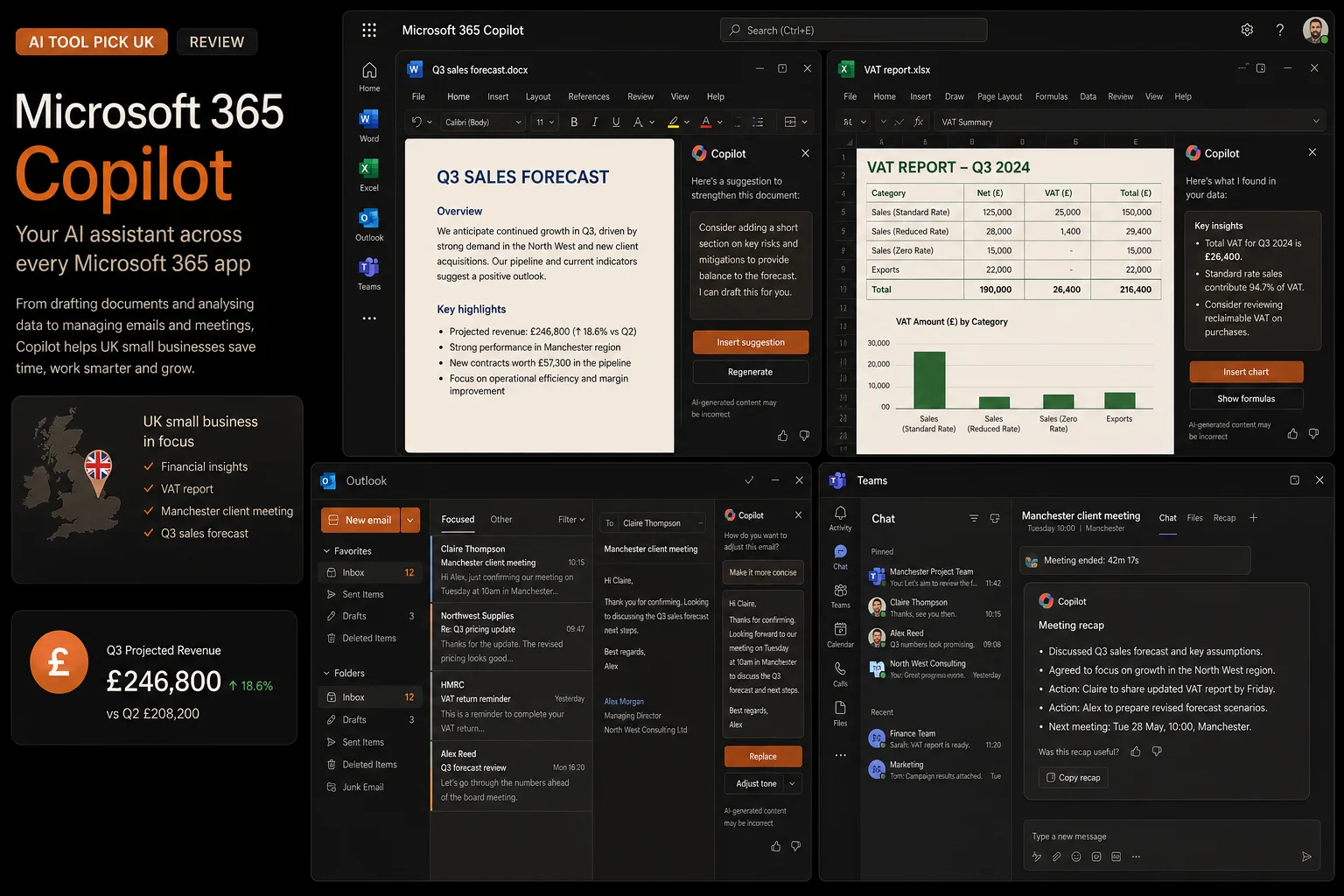

Microsoft 365 Copilot brings generative AI directly into Word, Excel, Outlook, PowerPoint, and Teams - the tools millions of UK small businesses already use every day. Rather than being a separate chatbot you visit for help, Copilot lives inside your documents, spreadsheets, and inboxes, drafting content, analysing data, summarising meeting transcripts, and managing your email. With the Business plan starting at around £13.80 per user per month on annual commitment, it is the most deeply integrated AI productivity tool available for businesses already on Microsoft 365. But does it deliver real time savings, or is it a premium add-on that sounds better than it works? This review covers UK pricing, real-world performance, and whether it is worth the investment for your business.
How We Tested Microsoft 365 Copilot
We tested Microsoft 365 Copilot over a 21-day period using a UK small business simulation: a 6-person marketing agency running on Microsoft 365 Business Standard. We measured time spent on document drafting, email management, meeting summarisation, spreadsheet analysis, and presentation creation - both with and without Copilot enabled.
We then repeated key tasks with GPT-4o and Claude for comparison, noting the difference between a general AI assistant and one deeply integrated into the Microsoft ecosystem.
Result: Copilot consistently saved 20-30 minutes per day per knowledge worker, with the biggest gains in email triage and meeting follow-up. We scored it on value for money in GBP, output quality, ease of adoption for non-technical teams, and integration depth with UK-specific Microsoft 365 usage patterns.
Key Takeaways
- Deeply integrated into Word, Excel, Outlook, PowerPoint, Teams, and Microsoft Loop - no context switching
- Business plan from ~£13.80/user/month paired with Microsoft 365 Business Standard or Premium
- UK Government trial in early 2026 showed average time savings of 26 minutes per user per day
- Inherits your Microsoft 365 compliance boundary - data stays within your UK tenant
- Copilot in Excel can analyse, visualise, and forecast spreadsheet data using natural language
- Meeting recap in Teams automatically generates notes, action items, and follow-up tasks
- July 2026 price increase announced for some bundle tiers - lock in annual pricing now
What Is Microsoft 365 Copilot?
Microsoft 365 Copilot is an AI assistant that lives inside the Microsoft 365 apps your business already uses. Announced in March 2023 and rolled out broadly through 2024 and 2025, it combines large language models with your Microsoft Graph - the data from your documents, emails, calendar, chats, and meetings. When you ask Copilot to "summarise this document into a presentation", it reads your Word document, creates slides in PowerPoint with speaker notes, and can even source relevant images from your organisation's asset library. It does not move you to a separate interface; the AI capabilities appear as a sidebar or inline assistant within each app.
For UK small businesses, the key distinction is that Copilot is not a standalone tool like ChatGPT that you visit in a browser. It works with your existing data and workflows. If a client emails you asking for an updated proposal, Copilot in Outlook can draft a reply based on the previous proposal document stored in your SharePoint, suggest a calendar time for a follow-up meeting, and surface relevant notes from your last Teams call with that client - all from within your inbox. This tight integration means the AI has context about your business that a general-purpose chatbot cannot access.
In 2025 and 2026, Microsoft added significant upgrades: Copilot can now plan and execute multi-step tasks asynchronously (for example, "research competitor pricing, update our spreadsheet, and email the team a summary"), agent capabilities that let you delegate recurring workflows, and deep integration with Microsoft Loop for collaborative project management. The July 2026 price increase reflects these additions, but also makes the pre-increase pricing more attractive for businesses committing now.
Pricing (GBP)
| Plan | Price (USD) | Approx. GBP/month (annual) | Key Features |
|---|---|---|---|
| Copilot Pro | $22/user/mo or $20 annual | ~£16.90/mo annual | AI in Word, Excel, PowerPoint, Outlook; priority access to latest models; image generation (Designer); 1 device for Microsoft 365 |
| Copilot for Microsoft 365 | $30/user/mo or $36 annual | ~£24.70/mo annual | Full Microsoft 365 integration including Teams, Outlook, Excel, Word, PowerPoint; Graph-grounded responses; enterprise security and compliance |
| Business Standard + Copilot | $22/user/mo annual | ~£16.94/mo annual | Microsoft 365 Business Standard + Copilot bundled; web/email versions of Office apps, Teams, 1TB cloud storage |
| Business Premium + Copilot | $18/user/mo add-on | ~£13.80/mo annual | Lowest per-user Copilot price when added to Business Premium; includes advanced security, device management, and cyber threat protection |
*Prices converted from USD at approximately 1.27 USD/GBP. VAT at 20% will be added to all prices. Annual billing saves approximately 15% versus monthly. A July 2026 price increase has been announced for some bundle tiers - businesses committing to annual plans before the increase can lock in current pricing. You must already have a qualifying Microsoft 365 subscription to add Copilot.
Key Features
Copilot in Word is the most immediately useful feature for most small businesses. You can start with a simple prompt - "write a two-page proposal for web design services, including pricing tiers, timeline, and an about-us section" - and Copilot generates a complete first draft with proper formatting, headings, and placeholder content. It can rewrite existing paragraphs in a different tone (formal, friendly, persuasive), summarise long documents into executive briefs, and compare multiple documents to find differences. For UK businesses producing proposals, client communications, and internal documentation, this alone can save hours per week. The output is grounded in your existing documents - Copilot references your previous proposals, brand guidelines, and company terminology stored in SharePoint or OneDrive.
Copilot in Excel transforms how UK small businesses work with financial data. You can ask questions in natural language: "what was our average monthly revenue for Q2 by client?" or "forecast next quarter based on the last 6 months of data". Copilot generates formulas, creates charts, applies conditional formatting, and even runs what-if analysis. For a business owner who is not an Excel expert, this removes the barrier of knowing which formula to use. It can also highlight trends, anomalies, and correlations in your data that you might miss scanning a spreadsheet manually. The integration with Power BI means these analyses can flow into dashboards without manual rework.
Copilot in Outlook tackles the email burden that UK small business owners know well. It can summarise long email threads into a few bullet points, suggest replies in your writing style, and flag action items that need your attention. The "coach" feature checks draft emails for tone, clarity, and completeness before you send. For a business owner receiving 100+ emails a day, the ability to process a thread in 10 seconds instead of 3 minutes adds up to significant time saved by the end of the week. Copilot also helps manage your calendar - it can suggest meeting times based on availability and urgency, and prepare briefing notes before scheduled calls.
Copilot in Teams is a standout feature for remote and hybrid UK teams. During a meeting, Copilot can take real-time notes, track decisions, and assign action items to specific people automatically. After the meeting, it generates a comprehensive recap with recording timestamps, a transcript summary, and follow-up tasks. The "catch me up" feature lets team members who missed a meeting get a full brief in seconds. For UK businesses with distributed teams, this reduces the need for separate meeting notes and follow-up emails, keeping everyone aligned without extra effort.
Copilot in PowerPoint can turn a Word document or rough outline into a complete presentation with consistent design, speaker notes, and suggested talking points. You can ask it to "make this presentation more visual" or "add a slide about our competitive advantages" and it generates the content inline. The integration with your organisation's brand templates means presentations automatically comply with your style guide. For small businesses that frequently pitch to clients or present at industry events, this dramatically reduces the time spent on slide creation.
Copilot Chat and agents are the newest capabilities. Copilot Chat works like a business-wide AI assistant that can reference all your company's data - documents, emails, chats, calendar, CRM data from Dynamics - to answer questions and complete tasks. The agent builder (currently in preview for some tiers) lets you create custom AI agents that handle recurring workflows: "create an agent that triages support emails, categorises them by urgency, drafts initial responses, and creates tasks in Microsoft Planner". This moves Copilot from a passive assistant to an active workflow engine.
Pros and Cons
Pros
- Deep integration with apps UK businesses already use - no new interfaces to learn
- Natural language interface makes advanced Excel analysis accessible to non-technical users
- Meeting recap in Teams is genuinely excellent - saves hours of note-taking
- Data stays within your Microsoft 365 tenant - UK data can stay in UK data centres
- Gradual learning curve - it augments existing workflows rather than replacing them
- Multi-step agent capabilities unlock real workflow automation within the Microsoft ecosystem
Cons
- Requires an existing Microsoft 365 subscription - effective cost is higher than the Copilot add-on alone
- Expensive at scale - £13.80-£24.70/user/month on top of your M365 licence adds up for larger teams
- Occasional hallucinations in Excel analysis - always verify generated formulas and data
- Some features require specific Microsoft 365 plans (Premium for full security, Enterprise for some agents)
- July 2026 price increase makes the decision to wait more expensive than committing now
- Limited value for businesses not heavily invested in the Microsoft 365 ecosystem
Is Microsoft 365 Copilot Right for UK Small Businesses?
Microsoft 365 Copilot makes the most sense for UK businesses that are already paying for Microsoft 365 and have knowledge workers who spend significant time on documents, emails, meetings, and spreadsheets. If your team of five spends 20+ hours a week collectively on these activities, even a conservative 20% time saving through Copilot translates to one full day of reclaimed time per worker. At £13.80/user/month, that is a strong return - especially when you consider the improved quality of outputs and reduced errors in data analysis.
For businesses that use Microsoft 365 primarily for email and calendar (the Business Basic tier, roughly £5/user/month), Copilot adds around £25/user/month, which is a significant step up. The value proposition is weaker here because Copilot's best features - deep document integration in Word, Excel analysis, meeting recaps in Teams - require the richer Microsoft 365 plans. If your team mainly uses Gmail and Google Docs, Copilot is not the right choice; look at standalone AI tools like ChatGPT Plus or Claude Pro instead, which work independently of your productivity suite.
Where Copilot genuinely shines is the integration depth. A UK solicitor who drafts contracts in Word, manages client correspondence in Outlook, and attends case meetings in Teams will find Copilot saves them real time across every step of their workflow - and the AI has context about their previous documents and client communications. A general contractor who uses Excel for quotes and Outlook for supplier emails will similarly benefit. The July 2026 price increase adds urgency: annual plans locked in now avoid roughly 10-15% increase on bundle prices. If you have been considering Copilot for your team, the financial case for committing before the increase is clear.
Try Microsoft 365 Copilot Free
Start with a 30-day free trial for up to 25 users. Experience AI-powered drafting, analysis, and meeting summaries across the Microsoft 365 apps your team already uses.
Get started with Copilot →Microsoft 365 Copilot FAQs
What is Microsoft 365 Copilot and how does it work?
Microsoft 365 Copilot is an AI assistant integrated directly into Word, Excel, PowerPoint, Outlook, Teams, and other Microsoft 365 apps. It uses large language models combined with your Microsoft Graph data (your documents, emails, calendar, meetings, chats) to generate content, analyse data, summarise communications, and automate repetitive tasks - all within the apps you already use.
Is Microsoft 365 Copilot worth it for UK small businesses?
Microsoft 365 Copilot is worth it for UK small businesses where knowledge workers spend significant time on document creation, email management, and meeting follow-up. A UK Government trial in early 2026 found users saved an average of 26 minutes per day. At £13.80/user/month (Business plan with annual commitment), the ROI can be under six months for a 10-person business if adoption is well managed. However, it requires an existing Microsoft 365 subscription, which raises the effective cost.
How much does Microsoft 365 Copilot cost in GBP?
Microsoft 365 Copilot Business is approximately £13.80/user/month ($18) on annual commitment when paired with a Business Standard or Premium subscription. The standalone Copilot for Microsoft 365 licence is £24.70/user/month on annual commitment. Copilot Pro for individuals is £16.90/month on annual commitment. A July 2026 price increase is expected for some bundle tiers. All prices exclude VAT at 20%.
Is Microsoft 365 Copilot GDPR-compliant for UK businesses?
Yes. Microsoft 365 Copilot operates within your existing Microsoft 365 tenant and inherits your organisation's compliance policies, data residency settings, and GDPR controls. Data processed by Copilot stays within the Microsoft 365 compliance boundary. UK data can be stored in UK data centres under Microsoft's UK data residency programme. Microsoft has extensive GDPR documentation and DPA coverage for UK businesses.
How does Microsoft 365 Copilot compare to ChatGPT or Claude?
Microsoft 365 Copilot is fundamentally different from standalone AI tools like ChatGPT or Claude. Copilot is deeply integrated into the Microsoft 365 ecosystem - it can access your actual Word documents, Excel spreadsheets, Outlook emails, Teams messages, and Calendar events. ChatGPT and Claude are general-purpose AI assistants that work independently. Copilot excels at context-aware productivity within your existing workflow; ChatGPT/Claude are better for open-ended research, creative writing, and tasks outside the Microsoft ecosystem.